Seldavino 3-Piece Ergonomic Wrist Rest & Desk Mat Set with Keyboard Support and Cushioned Mouse Pad for a Coordinated Workspace
Seldavino 3-Piece Ergonomic Wrist Rest & Desk Mat Set with Keyboard Support and Cushioned Mouse Pad for a Coordinated Workspace
Couldn't load pickup availability

Seldavino 3-Piece Ergonomic Wrist Rest & Desk Mat Set with Keyboard Support and Cushioned Mouse Pad for a Coordinated Workspace
Your Workspace Has Three Everyday Zones. Bring Them Together. 🖤
There is the place where you type, the space where your mouse moves, and the surface that brings everything together. Most desks acquire these areas one item at a time. A keyboard here, an old mouse pad there, a bare patch of desktop between them. Functional, perhaps, but not always considered as a whole.
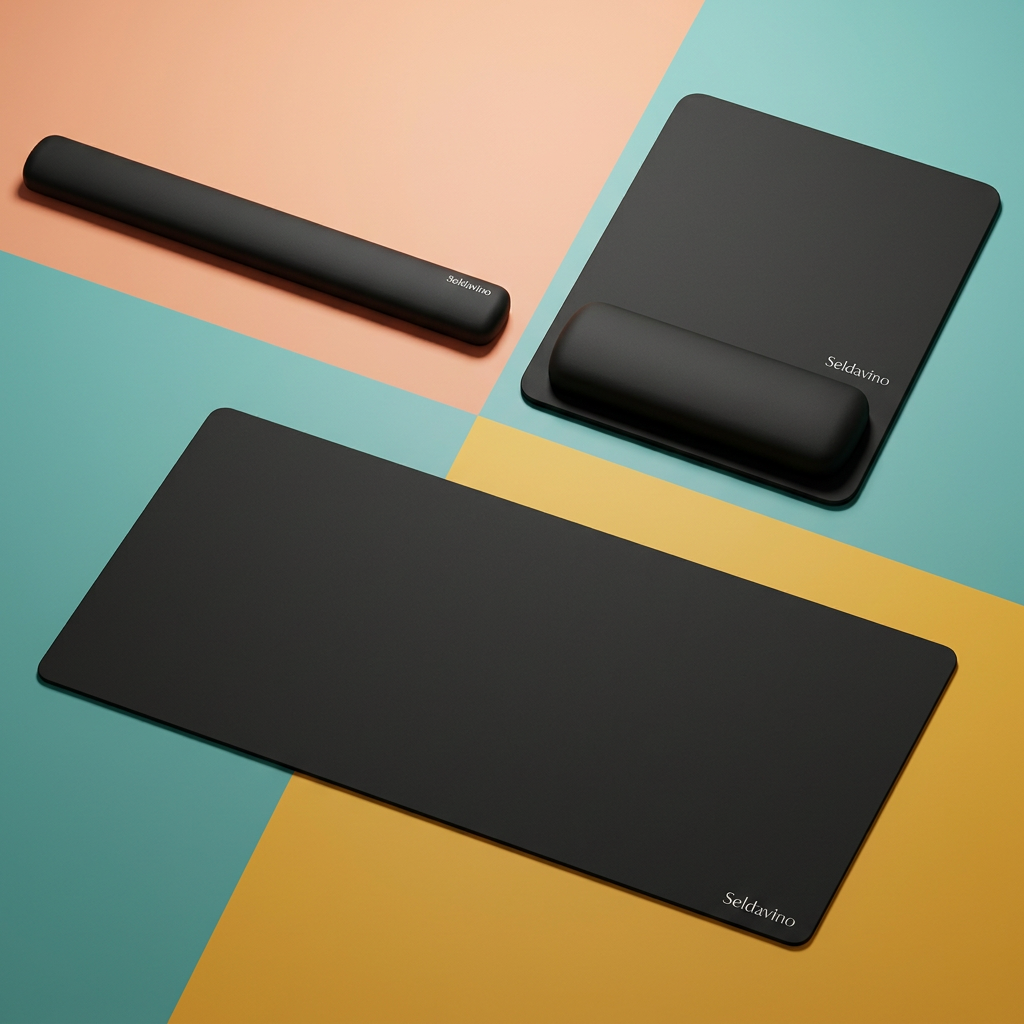
The Seldavino 3-Piece Wrist Rest & Desk Mat Set takes a coordinated approach. A long keyboard wrist rest, a mouse pad with a raised wrist cushion, and a flat rectangular desk mat share a clean black appearance. Each has its own role, while the matching finish gives your workspace a more deliberate visual rhythm.
Keep the look understated or place it against your favorite colors. The black surfaces work as a quiet foundation for the rest of your setup, without asking you to replace the devices you already use.
Zone One: The Space in Front of Your Keyboard ⌨️
The long wrist rest creates a distinct resting area along the front of your keyboard. Its elongated shape follows the keyboard zone, while rounded ends and a gently curved upper profile give it a softer-looking outline than a hard desk edge.
Because it is separate from the keyboard, you can position it to suit the available space rather than relying on a built-in palm rest. Start with the keyboard where you normally use it, then place the rest in front and check the relationship between their heights. The arrangement should suit your own hands and working position, not push them into a fixed angle.
Use the rest lightly during pauses as appropriate for your setup. Avoid pressing the sensitive underside of your wrist against an edge or treating a raised cushion as a reason to keep your hands still for long periods. A desk accessory should fit into your routine, not dictate it.
Zone Two: A Defined Place for Your Mouse 🖱️
The mouse pad combines a flat movement area with a raised cushion along its near edge. That difference in profile is the defining detail: space for the mouse behind, a separate resting area toward you, and a rounded rectangular outline that keeps the arrangement visually contained.
Position the mouse pad close enough that it does not require an exaggerated reach from your usual seated position. Move the mouse around the usable flat area and check that the cushion does not interfere with your preferred motion. If you use broad sweeping movements, compare the actual movement area with the space you normally need before choosing the set.
The pictured shape does not establish tracking performance for every sensor or a particular glide speed. Mouse size, sensitivity settings and personal technique all affect how a pad feels in use.
Zone Three: The Surface That Frames the Setup 🗂️
The large, flat desk mat creates a visual base beneath your everyday arrangement. Its rectangular form and rounded corners echo the other pieces without adding another raised resting surface. Place it where it gives the keyboard area a clear boundary, then arrange the other components according to your own desk dimensions.
A dark mat can make pale keycaps stand out, bring contrast to a wooden desk or sit quietly within an all-black workspace. It also helps define where the tech area ends and where your notebook, planner or reading space begins. The result is not about filling every inch. It is about giving the things you use a more coherent setting.
One Set, Several Ways to Style It 🎨
The bright home office
Let the black pieces anchor a colorful surface. A teal desk mat area, coral wall or mustard notebook can add personality around the set while the matching accessories keep the keyboard and mouse zones visually connected. Leave enough open space that each item has room to function.
The understated work corner
Pair the set with a wood-tone desk, a simple lamp and a small tray for loose essentials. The rounded profiles soften the appearance of an otherwise straight-edged arrangement, while the black finish keeps the accessories from competing with the room.
The evening creative station
When the work changes from messages to editing, planning or personal projects, the same layout can remain in place. Adjust the lighting and move the devices as needed. There is no requirement to build an entirely different desk around each part of the day.
A Small Scene From an Ordinary Workday 📝
You sit down with a short list of tasks and a cup placed safely away from the equipment. The keyboard has its space, the mouse pad sits beside it, and the long rest is aligned where you want it for pauses. Instead of several unrelated surfaces, the desk feels like one arrangement.
After a call, you slide the keyboard back to make room for a notebook. Later, you return it to the same area and check that the rest is still positioned comfortably. At the end of the session, you clear the loose items and leave the three matching pieces ready for the next time. It is an uncomplicated kind of order, built around the movements you already make.
Arrange First. Adjust Second. Recheck as You Work. 🔄
- Begin with a clean, level surface. Remove grit or debris before laying out the mat and pads.
- Place your keyboard naturally. Allow room in front for the separate long rest, and compare their heights before settling on a position.
- Bring the mouse area within reach. Keep the mouse on the flat tracking area, behind the raised cushion.
- Try the full arrangement. Type briefly, move the mouse and pause. Reposition any piece that restricts movement or encourages pressure.
-
Keep changing position. Take regular breaks and reassess the setup when you change your chair, keyboard or desk height.

What the Set Is, Without the Guesswork 🧾
- One long keyboard wrist rest: a separate black accessory with rounded ends and a raised curved profile.
- One mouse pad with wrist cushion: a flat mouse area paired with an integrated raised section near the user.
- One rectangular desk mat: a coordinated flat surface with rounded corners.
- A matching visual finish: understated black across the three-piece arrangement.
Keyboards, mice, computers, lamps and other styling accessories shown in lifestyle images are not included. Check the confirmed dimensions against your keyboard width, available desk area and preferred mouse movement space before purchase.
Comfort Is Personal. Keep the Claims Practical. 🧭
The set offers resting surfaces and a coordinated layout; it does not establish a medically correct position for every user. Cushion height, keyboard profile, chair adjustment and your own habits all influence suitability.
No specific internal filling, memory-foam construction, cooling effect, waterproof rating or nonslip performance is claimed from the photograph alone. This is a desk accessory set, not a medical treatment, and it is not presented as preventing or relieving a particular condition. If a position causes discomfort, stop using that arrangement rather than trying to work through it.
Keep the Look Clean, Keep the Routine Simple 🧼
Brush away loose dust with a soft, dry cloth and follow the supplied care instructions for any further cleaning. Avoid soaking the raised rests, using abrasive tools or assuming the pieces are machine washable. Allow any cleaned surface to dry fully before putting your equipment back.
Check beneath the pieces occasionally, especially after moving them, and keep sharp objects away from the surfaces. A quick reset at the end of the day keeps the arrangement ready without turning desk care into another project.
Make the Whole Setup Feel Considered 🌙
A good-looking workspace is not only about the screen at its center. It is also the area in front of the keyboard, the place beside it and the surface underneath. The Seldavino 3-Piece Wrist Rest & Desk Mat Set brings those details into the same visual language.
Choose the layout that suits your equipment. Leave room to move. Let three matching pieces become the foundation for a desk that feels more like your own.