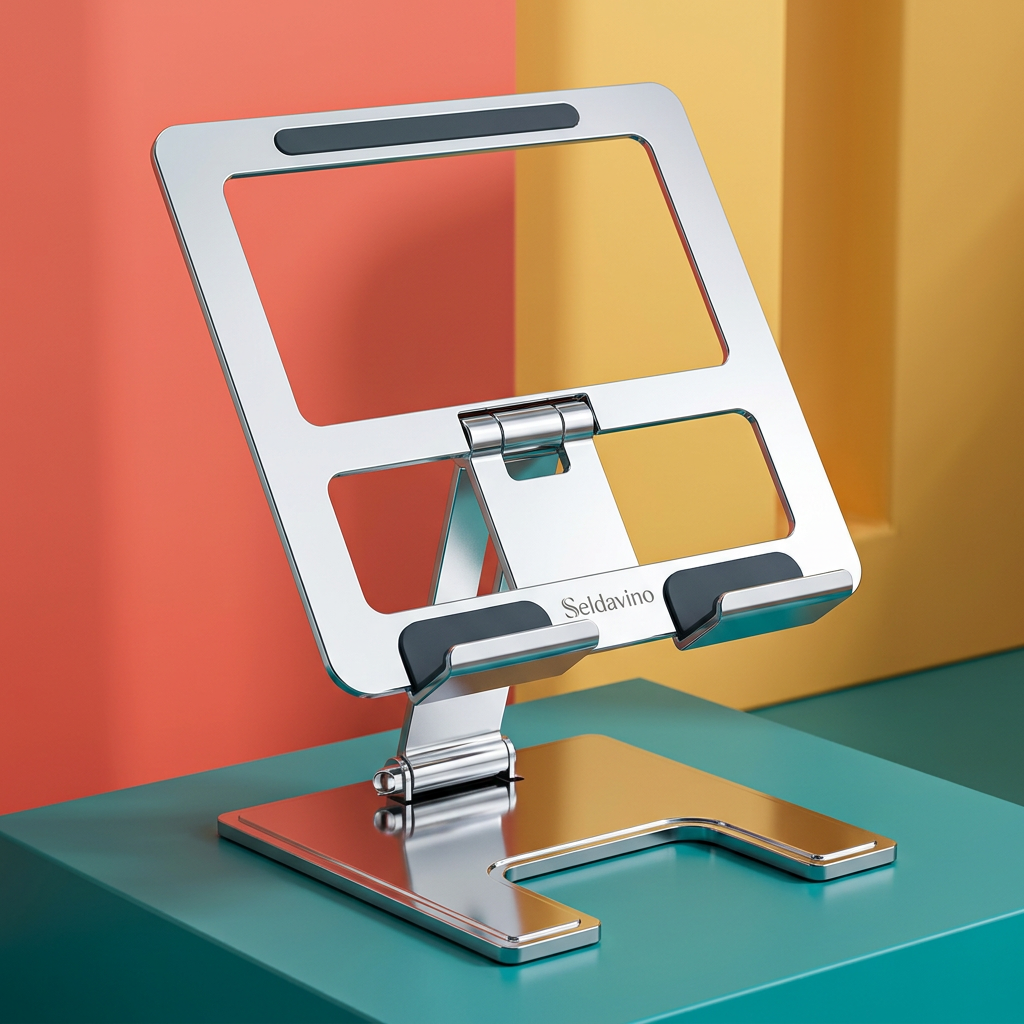
Seldavino Adjustable Desktop Tablet Stand with Hinged Support, Open Back Frame & Padded Cradle for Reading, Calls and Everyday Viewing
Seldavino Adjustable Desktop Tablet Stand with Hinged Support, Open Back Frame & Padded Cradle for Reading, Calls and Everyday Viewing
Couldn't load pickup availability

Seldavino Adjustable Desktop Tablet Stand with Hinged Support, Open Back Frame & Padded Cradle for Reading, Calls and Everyday Viewing
Let the Screen Hold Its Place While You Get On With Yours. 👐
A tablet can be a reference screen, a reading companion or a place to join a conversation. But when you are constantly holding it, leaning it against whatever is nearby or laying it flat between other objects, its position becomes another thing to manage.
The Seldavino Adjustable Desktop Tablet Stand gives a compatible device a dedicated resting place. Its silver-tone structure combines an open back frame, two lower cradle hooks, a central hinged support and a broad base with a front cutout. The result is a clearly defined desktop accessory with a purpose you can see: support the screen in a selected viewing position while leaving your hands available for other tasks.
No oversized enclosure. No busy arrangement of attachments. Just a mechanical stand that becomes part of the way you use the tablet you already own.
Begin With the Task, Then Choose the View. 🎬
Not every tablet session asks for the same arrangement. A reference page beside your notebook is different from a video call across the desk. A quiet reading break has different needs from checking instructions while you organize a project.
The hinged support gives the design an adjustable structure rather than a single fixed lean. Set the position within the stand's available range before placing your device, and check that the complete arrangement remains balanced. The exact adjustment range and supported load should be confirmed from the product specifications, not estimated from a photograph.
Think of the stand as a way to arrange the screen around the task. Bring your chair, lighting and viewing distance into that decision as well. A stand alone does not determine the right position for every person or every activity.
Follow the Design From the Screen to the Surface. 🏗️
At the back: an open frame
The upper structure outlines a rectangular support area without becoming a solid panel. A dark contact strip is visible near the top, adding contrast to the silver finish. The open center gives the frame its distinctive appearance and keeps the construction visually lighter than a full enclosure.
At the front: two defined resting points
The lower hooks form a ledge for the device's bottom edge. Pale contact pads are visible where the tablet rests against the cradle. The separated hooks leave a gap between them, rather than creating one continuous front rail. Check your own device's ports, buttons and case shape against this layout before use.
In the middle: a hinged connection
A central support links the upper frame to the base. The visible hinge is a functional part of the adjustable design, not simply a decorative joint. Handle the mechanism carefully, keep fingers clear of moving areas and remove the tablet before making adjustments.
At the desk: a broad foundation
The flat base has a front recess that gives it an open, U-notched outline. Its silver surface continues the visual language of the upper frame. Place the full base on a firm, level tabletop rather than allowing an edge to overhang or resting it on an unstable pile of papers.
Three Ways to Make It Part of Your Routine. 🗓️
The reference companion. Put your compatible tablet beside an open notebook while you review a document, compare ideas or work through a list. The stand keeps the screen in its own area so you can arrange the writing space separately. Leave enough room that you are not reaching across the device for every note.
The conversation corner. Prepare a place for the tablet before joining a call. Set the stand, check the screen position and use the camera preview to decide whether the complete setup suits the conversation. The stand does not include a camera, microphone or lighting; it simply gives the device a place to rest.
The reading pause. Move the tablet away from the busy center of the desk and create a small reading arrangement with a lamp and the essentials you actually need. Keep the base clear, adjust the viewing position before loading the device and make sure the screen remains easy to see without leaning into it.
A Small Change in an Ordinary Afternoon. ☁️
You open a reference document and start writing down the useful points. Instead of holding the tablet in one hand, you place it in the cradle and check that both lower hooks support it evenly. Your notebook stays in front of you, the screen sits to one side, and the desk becomes a place for two related tasks rather than a pile of competing objects.
Later, you remove the tablet, choose another supported position and prepare for a call. When you finish, the device lifts out and the stand remains ready for its next job. It is not about adding another complicated system to your day. It is about giving one familiar device a more deliberate place.
Silver That Fits Around Your Style. 🩶
The reflective silver-tone finish pairs naturally with dark screens, pale stationery and both light and deep wood tones. Use it as a restrained detail in a neutral office, or let it sit among richer colors such as teal, terracotta, mustard and burgundy.
The open frame and front-notched base give the stand a recognizable silhouette even without a tablet in place. That matters when the accessory remains visible between sessions: it can look intentional on the desk rather than like a temporary prop waiting to be put away.
Before You Bring Your Tablet to the Cradle. 🧮
Compatibility is more than a screen-size label. Compare your device's width, height, thickness and weight with the confirmed supported specifications. Include the case in those measurements if you plan to leave it fitted.
- Check the lower edge: it must sit securely within the cradle without balancing on a connector or protruding case detail.
- Check the contact points: the device should rest evenly rather than rocking against one corner.
- Check access: make sure the hooks and frame do not interfere with essential ports, buttons or cables.
- Check the complete position: the base must remain fully supported, with the device balanced in the chosen configuration.
The reference shows landscape use. Other orientations should only be used when the product specifications allow them and the device can be supported securely. Universal tablet compatibility, swivel rotation and a particular height range are not assumed.
Set It Up Deliberately, Not on the Fly. ✅
- Choose a clean, dry and level tabletop with enough clear space for the full base.
- With the tablet removed, set the support within its intended adjustment range and follow the supplied mechanism instructions.
- Check that the stand holds its position before adding your device.
- Place a compatible tablet into both lower hooks and confirm even contact with the support areas.
- Check balance before releasing the device or interacting with the screen. Avoid forceful tapping, leaning or pulling on connected cables.
- Remove the tablet before repositioning, carrying or adjusting the stand.

Useful Answers, Without Added Promises. 🗨️
Does it charge the tablet?
This listing describes a mechanical support stand, not a charging dock. No built-in charging or data connection is included in the described design.
Is the tablet included?
No. Tablets, keyboards, notebooks, lamps and other objects in lifestyle images are styling accessories and are not included.
Is it designed for every tablet and case?
No universal fit is claimed. Check the supplied dimensions, cradle clearance and load specifications against your exact device and case.
Can I use it as a drawing easel?
A viewing setup does not automatically establish suitability for sustained stylus pressure. Confirm the manufacturer's intended uses before choosing it for drawing or other pressure-intensive interaction.
Keep the Contact Areas Ready for the Next Session. 🪥
Remove the device before cleaning. Gently clear dust and grit from the cradle, pads and base using a soft, dry cloth, then follow the supplied care guidance for anything further. Avoid soaking the mechanism or using abrasive cleaners on the visible finish.
Check the contact pads and moving parts periodically. Stop using a damaged or loose stand rather than trying to compensate by balancing the tablet differently. The photograph does not establish a scratchproof surface, a particular metal alloy or certified nonslip performance.
One Clear Place for the Screen. More Choice for the Rest. 🛋️
The Seldavino Adjustable Desktop Tablet Stand brings together an open silver-tone frame, a padded lower cradle and hinged support in a purposeful desktop form. Choose it for a compatible device when you want to separate screen placement from the rest of your workspace.
Set the view, check the fit and build your next reading session, reference setup or conversation around a screen that has its own place.