Seldavino Foldable Laptop Stand with Adjustable Support, Padded Rails & Compact Folding Design for Flexible Workspaces
Seldavino Foldable Laptop Stand with Adjustable Support, Padded Rails & Compact Folding Design for Flexible Workspaces
Couldn't load pickup availability

Seldavino Foldable Laptop Stand with Adjustable Support, Padded Rails & Compact Folding Design for Flexible Workspaces
A Little Lift. A More Intentional Workspace. ✨
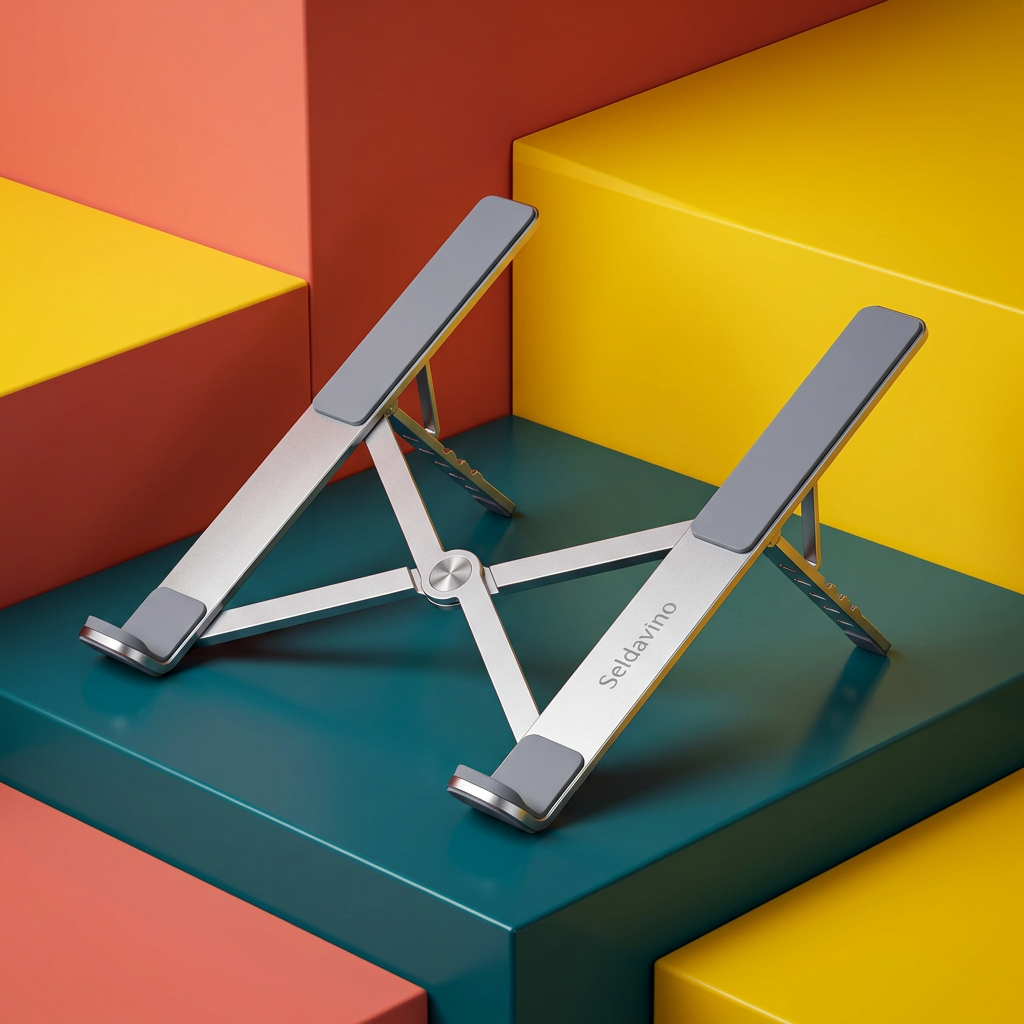
Your desk does not need to be bigger to feel better considered. Sometimes, the difference is a simple change in how you position the device you use every day. The Seldavino Foldable Laptop Stand brings a raised, angled resting position to your laptop, with a silver-tone frame, dark contact pads and an open design that keeps the arrangement visually light.
Set it beside your favorite notebook, pair your laptop with a separate keyboard, and turn an ordinary surface into a workspace that feels ready for the day. From a dedicated home office to a temporary desk in the corner of a room, this is a practical foundation for a more deliberate setup.
Look Closely: The Useful Details Are Built Into the Shape 🔍
The design begins with two elongated support rails rather than a solid platform. Dark pads sit along the upper contact areas, creating a cushioned interface between the stand and the underside of your laptop. At the front, curved retaining ends form a physical resting edge for the device when the stand is inclined.
Below the rails, a crossing brace connects the two sides. Rear support pieces and visible notches provide the structure for adjusting the resting position. Together, these elements give the stand its distinctive folding profile: open through the center, purposeful at the contact points, and free from the visual bulk of a full desktop riser.
- Twin support rails: a defined resting surface beneath either side of your laptop.
- Dark contact pads: cushioning where the device meets the frame.
- Curved front stops: a ledge for the lower edge of the laptop to rest against.
- Notched rear supports: an adjustable structure for selecting the available incline.
- Cross-braced frame: a connected design that folds inward for storage.
From Morning Planning to the Last Tab of the Day ☀️
Start with the small rituals that make work feel organized. Open your laptop, settle it on the stand and place your notes where you can reach them. With a separate keyboard in front and a mouse to one side, your screen and your hands no longer need to share the same fixed arrangement.
Later, when the desk becomes a place for sketching, reading or sorting the week's paperwork, remove your laptop and fold the stand away. It is a straightforward way to let one surface serve more than one purpose, without building your room around a permanent workstation.
Choose Your Setup, Not Someone Else's Routine 🎛️
A working position is personal. The notched support design lets you choose from the stand's available positions instead of settling for one fixed incline. Select the position before placing your laptop on the rails, and make sure both sides are seated evenly.
For longer sessions, consider using an external keyboard and mouse so you can arrange your input devices separately from the raised screen. Adjust your chair and viewing distance to suit your own space. The stand is a positioning accessory, not a medical device or a promise of a particular posture outcome.
Open Through the Center, Clear in Its Purpose 🌬️
Unlike a broad solid tray, the rail-based frame leaves much of the area beneath the laptop uncovered. The result is an airy-looking setup with a visible gap below the device. The stand does not include powered cooling, and it does not replace your laptop manufacturer's ventilation guidance.
Before use, check where your laptop's vents and feet are located. Position the device so it rests securely on the intended contact areas, without obstructing openings or relying on a narrow edge for support.
A Desk Accessory That Can Leave the Desk 🎒
The folding construction is useful when your workspace changes. Collapse the frame after removing your laptop, then store it with your work essentials or in a drawer until the next session. The slim rail-based form makes the design less visually intrusive than a permanent platform.
Heading between rooms or planning to work elsewhere? Check the folded stand against the space available in your own bag before packing. Keep it away from exposed screens and other delicate surfaces during transport, and avoid placing heavy items on its moving parts.
Set Up in a Few Deliberate Steps 🛠️
- Place the stand on a clean, level and firm surface.
- Open the frame and seat both rear supports evenly in the intended positions.
- Check that the frame is fully supported before adding your laptop.
- Center your laptop across the padded rails, with its lower edge resting behind the front stops.
- Check the resting position before typing or connecting cables. Remove the laptop before changing the incline or folding the stand.

Before You Choose: A Few Practical Answers 💬
Will it fit my laptop?
Fit depends on the laptop's dimensions, underside shape and weight, as well as the stand's confirmed specifications. Do not assume universal compatibility. Check those details before purchase, especially for unusually small, large or heavy devices.
Does it need power?
The pictured design is a mechanical folding support, with no powered adjustment or built-in fan shown.
Are the laptop and desk accessories included?
This listing is for the laptop stand. Laptops, keyboards, bags, notebooks and other styling items shown in lifestyle images are not included.
How should I look after it?
Wipe the frame and contact areas gently with a soft, dry cloth. Remove grit before positioning your device, keep the adjustment areas clear and check that the supports are seated before each use.
Make Room for a Workspace That Feels Like Yours 🧩
Colorful or minimal. Shared or dedicated. Ready for focused work or packed away at the end of it. The Seldavino Foldable Laptop Stand brings together an adjustable support structure, cushioned contact areas and a fold-away design for the way your day actually moves.
Choose a considered place for your laptop, then build the rest of your setup around you.